



instant belters, zero faff
garageToolz
€29,99
€39,99save 25%
VST3AU
garageToolz is a compact sample-based VST plugin with the sounds of classic hardware — bass, chords, stabs, organs, FX, and textures.
Inspired by analog hardware, shaped for modern production and ready for the club.
🔊 Features
- 130 curated samples (-+130 MB)
- with 30 × bass, 30 × chords, 30 × stabs, 10 × organs, 20 × SFX and 10 × textures
- Attack & Release envelope controls
- Filter & Resonance section
- FX: Reverb + Size, Chorus (on/off) + Width
- Built-in preset system for customizing samples
- Low CPU usage
Compatibility: VST3 / AU for Windows 10+ & macOS 10.13+
Compatible with any DAW (Ableton, Logic, Fruity Loops, etc.) that supports VST3 / AU plugins.
100% royalty-free. Use these sounds in your own releases — put them in a track, sign it, sell it. No clearance, no extra fees, nothing to report.
pick your box
2 plugins
garageToolz + chordBox
€65,49 €69,98
add both →
best value
all 7
the belter bundle · incl. the free sample pack
€129 €209,94
save €80,94 →
3 or more build your box from €72,25 pick & save ↓
- instant download after checkout
- works in all major DAWs (VST3 · AU)
- no license key needed. drag, drop, done
how to install & activate
1. after checkout you get an instant download link by email (check spam too). that link opens your download portal.
2. Mac and Windows both have their own installer — run it, then rescan your plugins in your DAW.
need a hand? hit support, we usually reply within a few hours.
system requirements
Windows 10 or later or macOS 10.13 (High Sierra) or later. 4GB RAM and up · both Intel and Apple Silicon Macs supported · VST3 / AU (64-bit), works in any major DAW.
hear it
press play. hear the keys.
real analog keys, chords and stabs — drag, drop, done.
fx_cantmiss
stab_lifehack
chord_coffeeonthempc
bass_lately
chord_notanorgan
bass_clippingreese
Shape your sound.
Attack, release, filter, reverb, chorus — shape your sound in seconds. Every knob dialed in for instant impact
Browse. Load. Belter.
130 club-ready sounds at your fingertips. Bass, chords, stabs, organs, SFX, textures — scroll, click, and you're in the mix. No digging through folders. No wasting time. Just instant ammo for your next track.
from feed to DAW
out in the wild
real producers putting belterbox to work.
take the tour
every knob, explained
tap a number to find it on the plugin.
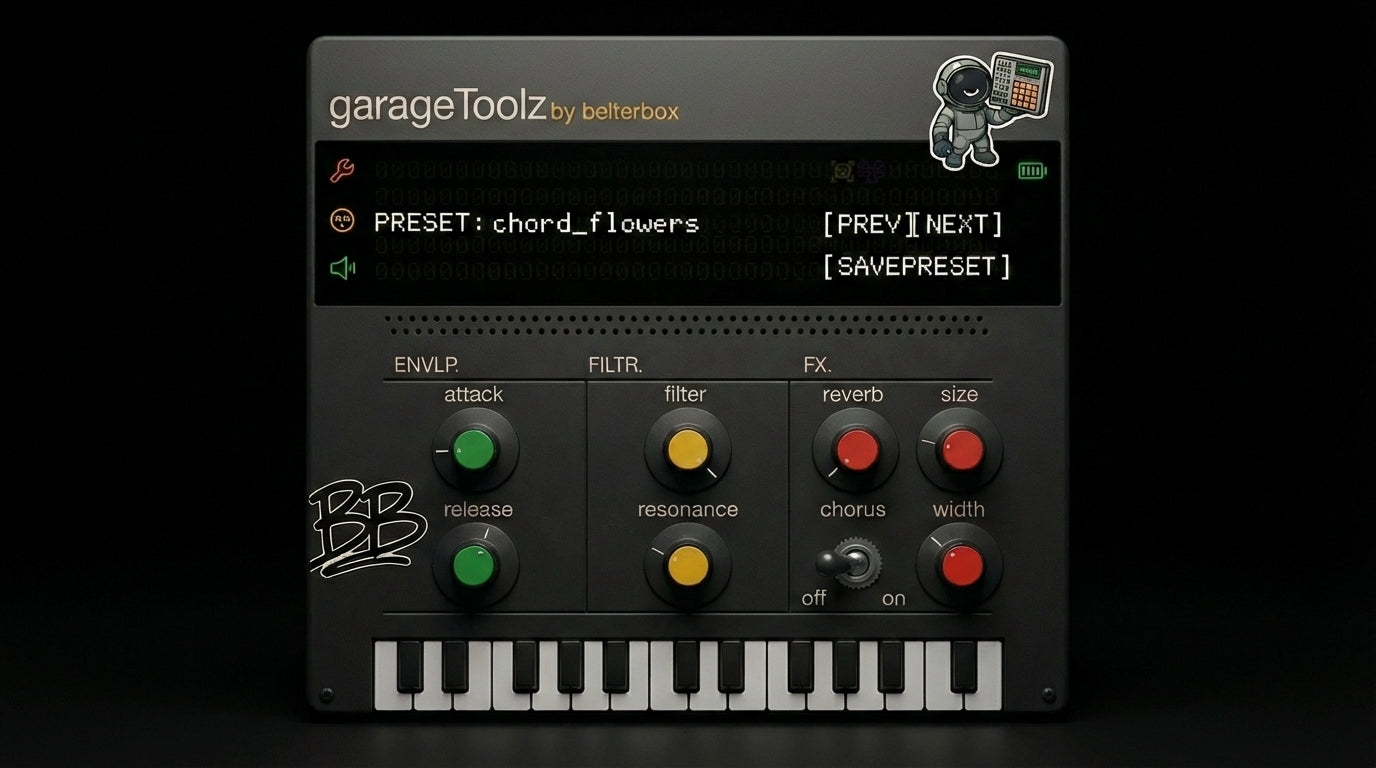
Chorus: Thicken your sound with instant stereo width.
Preset System: Navigate, save and recall your favorite settings instantly.
Filter: Shape your tone from bright to dark, with added edge and bite.
Reverb: Add space to your sound, from tight room to wide hall.
Envelope: Control how fast the sound hits and how long it rings out.
Volume: Adjust volume output
Settings: Adjust the size of the UI
- 1Chorus: Thicken your sound with instant stereo width.
- 2Preset System: Navigate, save and recall your favorite settings instantly.
- 3Filter: Shape your tone from bright to dark, with added edge and bite.
- 4Reverb: Add space to your sound, from tight room to wide hall.
- 5Envelope: Control how fast the sound hits and how long it rings out.
- 6Volume: Adjust volume output
- 7Settings: Adjust the size of the UI
the reviews
what producers say about belterbox
more belters
you may also like